
It started with a simple message: “Bro, send me the .env file.”
If you've worked on a project with other developers, you've probably seen this happen.
The project is on GitHub. The source code is already shared. Everyone can clone the repository and start working.
But there is one file that isn't there:
.envBecause .env usually contains things like:
DATABASE_URL=postgres://username:password@database.example.com/app
GEMINI_API_KEY=AIzaSyXXXXXXXX
JWT_SECRET=super-secret-value
These aren't normal configuration values.
They are credentials.
So we do what developers have been doing for years:
We send the file.
Maybe through WhatsApp.
Maybe Discord.
Maybe Telegram.
Maybe Slack.
Maybe directly over email.
It works.
Until you stop and think about what just happened.
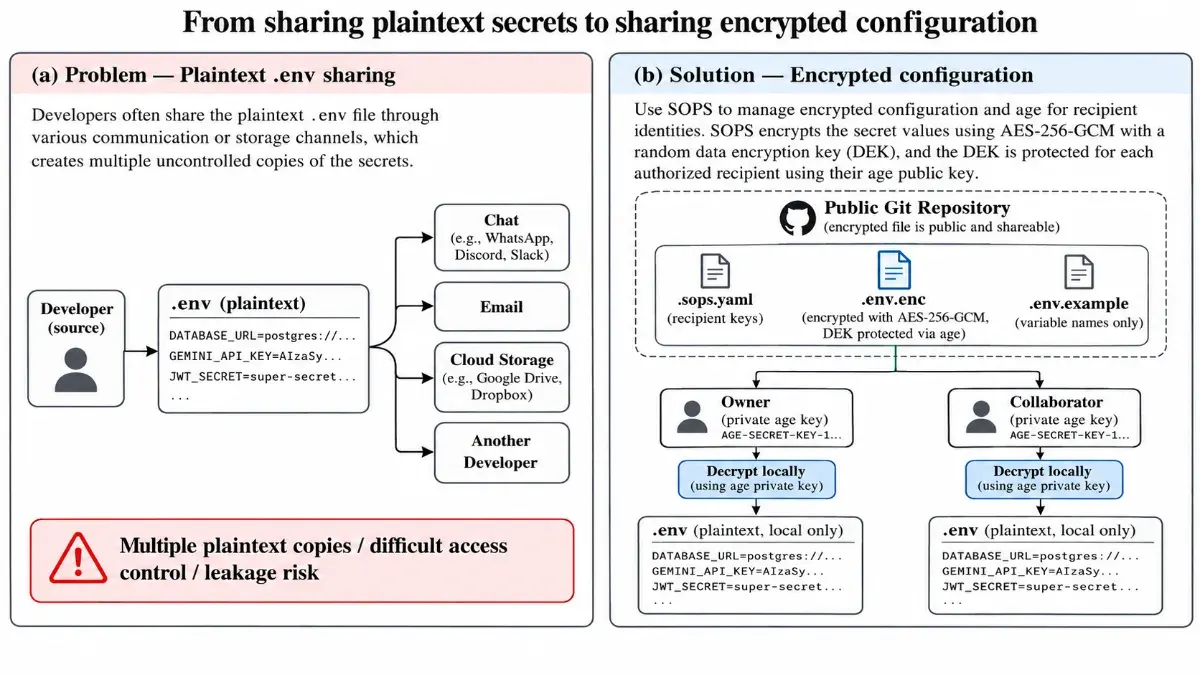
You have taken a file containing sensitive credentials and created another copy of it somewhere outside your project's security boundary.
And if the team grows from two developers to five, ten, or twenty, the problem gets worse.
That made me ask a slightly different question:
What if we could publicly share the encrypted .env file, while allowing only authorized developers to decrypt it?That question led me to SOPS and age.
And the interesting part is that this isn't simply "encrypting a file."
It is a small but practical example of hybrid cryptography, key management, authentication, and access control working together.
The Problem With Sharing .env
Let's start with the traditional workflow.
Imagine a project with three developers:
Souvik
Alex
Rahul
All three need:
DATABASE_URL=...
GEMINI_API_KEY=...
JWT_SECRET=...
The easiest solution is:
Souvik
   │
   ├── sends .env → Alex
   │
   └── sends .env → Rahul
Now there are three plaintext copies.
Maybe someone stores one in Downloads.
Maybe another person backs it up to Google Drive.
Maybe someone accidentally uploads it.
Maybe someone sends it to another developer.
The problem isn't only GitHub anymore.
The plaintext secret has escaped into multiple places.
The conventional solution is therefore:
.envAnd that's still good practice.
But now we have another problem:
How do we securely share the configuration with authorized team members?
That is where encrypted configuration becomes interesting.
What If the .env Could Be Public?
At first, this sounds absurd.
Why would we ever want to put .env in a public GitHub repository?
We don't.
We want to put an encrypted representation of it there.
Consider this original file:
GEMINI_API_KEY=AIzaSyXXXXXXXX
JWT_SECRET=my-super-secret-value
After encryption, we might have:
GEMINI_API_KEY=ENC[AES256_GCM,data:...]
JWT_SECRET=ENC[AES256_GCM,data:...]
The file is now useless to someone who doesn't possess an authorized decryption identity.
And because it is encrypted, it can be version-controlled.
This is the idea behind using SOPS.
Enter SOPS
SOPS stands for Secrets OPerationS.
But there is an important distinction.
SOPS is not itself an encryption algorithm.
It is a tool for managing encrypted configuration and secrets.
It supports different cryptographic backends, including:
- age
- PGP
- cloud KMS systems
For this project, we'll use:
SOPS + ageThe combination gives us a clean model:
SOPS
  ↓
Secret file management
  ↓
age
  ↓
Recipient-based cryptographic identities
But there is an even more interesting question.
How exactly is the file encrypted?
This is where the cryptography begins.
Is SOPS Using RSA?
This is where I initially had the same assumption many developers might have.
When we hear:
Public key + private key + encryption
our mind often jumps to:
RSA.
But in this particular SOPS + age setup, RSA is not the algorithm we should describe as being used.
The cryptographic architecture is different.
SOPS uses envelope encryption.
The actual secret values are encrypted using:
AES-256-GCM
And the randomly generated data encryption key is protected for authorized recipients using the configured cryptographic identities.
With native age recipients, the underlying public-key mechanism uses X25519, not RSA.
That distinction matters.
So instead of saying:
“SOPS uses RSA to encrypt the .env.”A technically accurate description is:
SOPS uses envelope encryption in which secret values are encrypted using AES-256-GCM with a randomly generated data encryption key, while age provides recipient-based public-key cryptography for protecting that key.
Now let's see what that actually means.
Understanding Envelope Encryption
Imagine that our .env contains:
DATABASE_PASSWORD=MyVerySecretPassword
GEMINI_API_KEY=AIzaSyXXXXXXXX
JWT_SECRET=MyJWTSecret
We don't want to use public-key cryptography to directly encrypt every byte of this file.
Instead, SOPS creates a random 256-bit Data Encryption Key, commonly called a DEK.
Conceptually:
Random 256-bit DEK

101101001010110101001010...
This key is temporary and generated for the encrypted file.
The secret values are then encrypted using:
AES-256-GCMSo:
              Plaintext secrets
                     │
                     ▼
              Random 256-bit DEK
                     │
                     ▼
                AES-256-GCM
                     │
                     ▼
             Encrypted values
This is the symmetric encryption layer.
AES is extremely efficient for encrypting data.
But now we have another problem.
What do we do with the DEK?
If we simply store the DEK alongside the encrypted data, anyone could decrypt everything.
So the DEK itself must be protected.
That's where the asymmetric cryptographic identities come in.
flowchart TD
    A[".ENV PLAINTEXT"] --> B["Random 256-bit DEK"]
    B --> C["AES-256-GCM"]
    C --> D["ENCRYPTED VALUES"]

    E["DATA ENCRYPTION KEY"] --> F["Owner<br/>Public Key"]
    E --> G["Developer A<br/>Public Key"]
    E --> H["Developer B<br/>Public Key"]

    F --> I["Protected DEK"]
    G --> J["Protected DEK"]
    H --> K["Protected DEK"]
SOPS uses envelope encryption: AES-256-GCM protects the data, while recipient-specific cryptography protects the data encryption key.
Meet age
age is the cryptographic tool we use to manage recipient identities.
Each developer has their own key pair.
For example, I might have:
Public key:
age1xxxxxxxxxxxxxxxxxxxxxxxx

Private key:
AGE-SECRET-KEY-1xxxxxxxxxxxx
My collaborator might have:
Public key:
age1yyyyyyyyyyyyyyyyyyyyyyyy

Private key:
AGE-SECRET-KEY-1yyyyyyyyyyyy
The public key can be shared.
The private key cannot.
This is a fundamental principle of asymmetric cryptography.
Think about it like this:
PUBLIC KEY
    ↓
Can be distributed
Can be stored in configuration
Can be committed to repository

PRIVATE KEY
    ↓
Must remain secret
Must remain with its owner
Must never be committed
The beauty of this model is that we don't need to create one shared password for the entire team.
Each person has their own cryptographic identity.
Step 1 - Install SOPS
Now let's stop talking about the theory and build it.
If you're using Windows, install SOPS:
winget install Mozilla.SOPSVerify:
sops --versionStep 2 - Install age
Install age:
winget install FiloSottile.ageVerify:
age --versionNow we have:
SOPS → manages the encrypted configuration

age → manages cryptographic identities
Step 3 - Generate the Owner's Key
Generate your age key:
age-keygen -o age-key.txtYou will get output similar to:
Public key: age1xxxxxxxxxxxxxxxxxxxxxxxxxxxxxxxxThe generated file contains your private key.
Conceptually:
# public key: age1xxxxxxxx...
AGE-SECRET-KEY-1xxxxxxxxxxxxxxxxxxxx
There are two pieces of information here.
Public key
age1xxxxxxxx...Safe to share.
Private key
AGE-SECRET-KEY-1xxxxxxxx...Never share it.
Never commit it.
Never put it in your public repository.
Add the key file to .gitignore:
age-key.txtStep 4 - Generate the Collaborator's Key
Now suppose Alex needs access.
Alex should generate their own key.
They run:
age-keygen -o age-key.txtAlex sends you only the public key:
age1yyyyyyyyyyyyyyyyyyyyyyyyAlex keeps:
AGE-SECRET-KEY-1yyyyyyyyyyyyprivate.
This is important.
You should never collect everyone's private keys and keep them yourself.
The entire point of the system is that each person controls their own private identity.
Step 5 - Configure SOPS
Now create:
.sops.yamlFor example:
creation_rules:
  - path_regex: \.env\.enc$
    age:
      - age1OWNER_PUBLIC_KEY...
      - age1COLLABORATOR_PUBLIC_KEY...
This configuration tells SOPS:
When creating or updating .env.enc, use these age recipients.Notice what is not here.
There are no private keys.
Only public recipient keys.
Step 6 - Create the .env
Let's create our original environment file:
DATABASE_URL=postgres://admin:password@localhost:5432/app
GEMINI_API_KEY=AIzaSyXXXXXXXX
JWT_SECRET=my-super-secret-value
This file should remain local.
Add it to .gitignore:
.env
age-key.txt
Step 7 - Encrypt the .env
Now the interesting part.
Run:
sops encrypt .env > .env.encSOPS reads the plaintext .env.
It generates the data encryption key.
It encrypts the secret values.
It protects the data key for the configured recipients.
And finally produces:
.env.encConceptually:
.env

DATABASE_URL=postgres://...
GEMINI_API_KEY=AIza...
JWT_SECRET=secret
becomes:
.env.enc

DATABASE_URL=ENC[AES256_GCM,data:...]
GEMINI_API_KEY=ENC[AES256_GCM,data:...]
JWT_SECRET=ENC[AES256_GCM,data:...]
The exact encrypted output contains additional SOPS metadata, including information about the recipients and integrity protection.
What Did SOPS Actually Do?
At this point, it's worth pausing.
We didn't just run an "encrypt file" command.
Several things happened conceptually.
Encryption Workflow
flowchart TD
    A[".env"] --> B["Generate random DEK"]
    B --> C["AES-256-GCM"]
    C --> D["Encrypt secret values"]
    D --> E["Protect DEK for each recipient"]
    E --> F[".env.enc"]
This is why the architecture is called envelope encryption.
The data is encrypted with a symmetric key.
The symmetric key is then protected using recipient-specific cryptography.
Step 8 - Test Your Decryption
Before pushing anything to GitHub, test it.
Tell SOPS where your private age key is:
$env:SOPS_AGE_KEY_FILE="$PWD\age-key.txt"Then:
sops decrypt .env.encIf everything is configured correctly, you'll get your original values:
DATABASE_URL=postgres://admin:password@localhost:5432/app
GEMINI_API_KEY=AIzaSyXXXXXXXX
JWT_SECRET=my-super-secret-value
The encrypted file can remain in Git.
The private key stays on your machine.
Step 9 - Push the Encrypted File to GitHub
Now your repository can look like:
my-project/
│
├── .sops.yaml
├── .env.enc
├── .env.example
├── .gitignore
├── package.json
└── src/
Your .gitignore:
.env
age-key.txt
Your .env.example can safely contain:
DATABASE_URL=
GEMINI_API_KEY=
JWT_SECRET=
Then:
git add .sops.yaml .env.enc .env.example .gitignore
git commit -m "Add encrypted environment configuration"
git push
Now something interesting has happened.
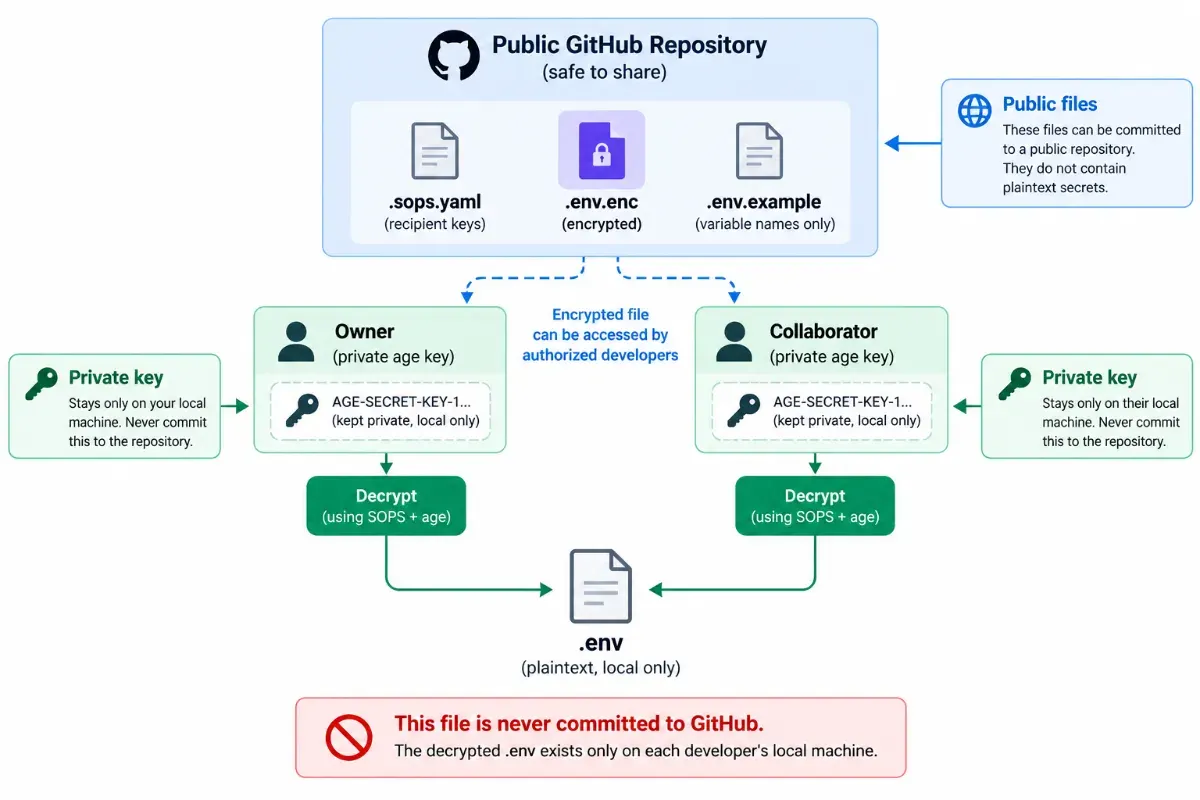
The GitHub repository can be public.
The encrypted file can be public.
But the plaintext secrets remain protected.
Why Can Both People Decrypt the Same File?
This is perhaps the most interesting part of the architecture.
Suppose our recipients are:
Owner
Collaborator A
Collaborator B
Their public keys are listed in .sops.yaml:
creation_rules:
  - path_regex: \.env\.enc$
    age:
      - age1OWNER...
      - age1COLLABORATOR_A...
      - age1COLLABORATOR_B...
The same encrypted data key can be protected for each authorized recipient.
Conceptually:
flowchart TD
    A["Data Encryption Key (DEK)"]
    A --> B["Owner key"]
    A --> C["Alex key"]
    A --> D["Rahul key"]

    B --> E["Protected DEK"]
    C --> F["Protected DEK"]
    D --> G["Protected DEK"]
Each person uses their own private key to recover the data encryption key.
Then AES-256-GCM is used to decrypt the actual secret values.
Therefore, the private keys never have to be shared with one another.
Adding Another Collaborator
Suppose Priya joins the project.
She generates her own key:
age-keygen -o age-key.txtShe sends you:
age1PRIYA...You add it to .sops.yaml:
creation_rules:
  - path_regex: \.env\.enc$
    age:
      - age1OWNER...
      - age1ALEX...
      - age1RAHUL...
      - age1PRIYA...
Then update the existing encrypted file:
sops updatekeys .env.encNow Priya's identity is included among the authorized recipients.
What Happens When Someone Leaves?
This is where cryptographic access management becomes important.
Suppose Alex leaves the project.
You remove Alex's public key from .sops.yaml.
Then:
sops updatekeys .env.encFor stronger key rotation:
sops rotate -i .env.encBut there is an important security principle here:
Revoking access to future versions does not erase secrets someone already obtained.
If Alex previously decrypted:
GEMINI_API_KEY=AIzaSy...you cannot mathematically make Alex forget it.
If that credential is considered compromised, the credential itself should be revoked or rotated.
Encryption solves the access problem.
It does not solve the human trust problem.
But What About Security Against Modification?
Confidentiality isn't enough.
Imagine someone changes:
GEMINI_API_KEY=ENC[...]to another ciphertext.
We also need to know whether the encrypted data has been tampered with.
This is where authenticated encryption becomes important.
SOPS uses AES-256-GCM, an authenticated encryption mode.
That gives us two important properties:
Confidentiality
      +
Integrity
In simple terms:
flowchart TD
    A["Encryption"] --> B["Nobody can easily read the secret"]
    B --> C["Authentication / Integrity"]
    C --> D["Unauthorized modification can be detected"]
SOPS also maintains integrity protection for the encrypted document structure.
So the system isn't merely trying to hide the values.
It also helps detect unauthorized manipulation.
A Note About RSA
At this point, let's settle the RSA question properly.
RSA is absolutely a real and important public-key cryptosystem.
You will encounter RSA in:
- TLS certificates
- SSH keys
- PGP
- digital signatures
- older and current security infrastructure
SOPS can also work with PGP, where RSA keys may be involved depending on the PGP key configuration.
But if our architecture is:
SOPS + agethen describing it as:
RSA encryptionwould be technically inaccurate.
For this setup, the important cryptographic primitives are:
AES-256-GCM
      +
     age
      +
X25519-based public-key cryptography
The distinction is important because good security documentation should identify the actual primitives being used rather than using "RSA" as a generic synonym for public-key encryption.
The Biggest Trap: Frontend Applications
There is one mistake that could completely undermine this architecture.
Suppose you have a React/Vite application.
You decrypt:
.env.encand then put:
VITE_SECRET_KEY=...into the frontend.
That secret is no longer secret.
Why?
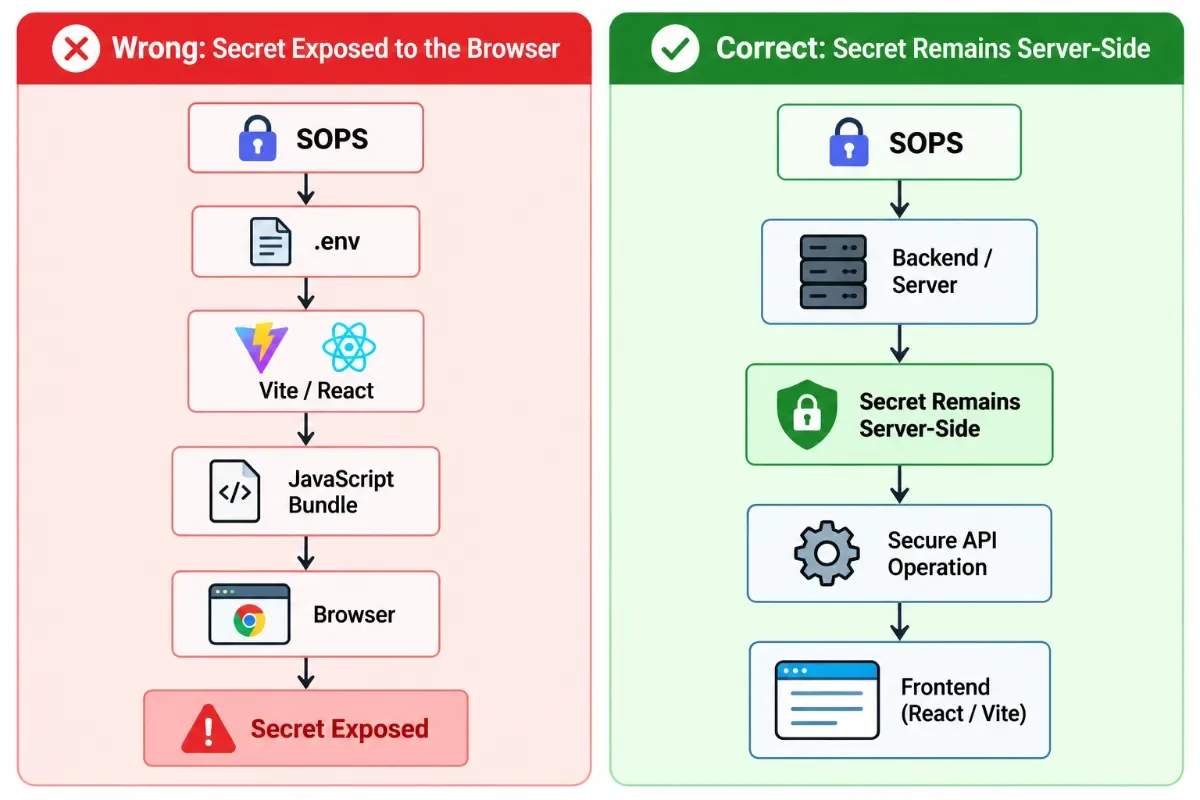
Because anything bundled into a frontend application can potentially be inspected by the user.
The browser is an untrusted environment.
Therefore:
flowchart TD
    A["SOPS"] --> B["Decrypt Secret"]
    B --> C["Backend / Server"]
    C --> D["Perform Sensitive Operation"]
    D --> E["Return Necessary Result"]
    E --> F["Frontend"]
is fundamentally different from:
flowchart TD
    A["SOPS"] --> B["Decrypt Secret"]
    B --> C["React / Vite"]
    C --> D["Browser"]
In the second architecture, you have simply hidden the secret during development and then exposed it at runtime.
What We Have Actually Built
At this point, our project has a very different workflow.
Instead of:
Developer A
     │
     ├── plaintext .env → Developer B
     │
     ├── plaintext .env → Developer C
     │
     └── plaintext .env → Developer D
we have:
flowchart TD
    A["GitHub"] --> B[".env.enc"]

    B --> C["Owner<br/>Private Key"]
    B --> D["Alex<br/>Private Key"]
    B --> E["Rahul<br/>Private Key"]

    C --> F["Decrypt"]
    D --> G["Decrypt"]
    E --> H["Decrypt"]
The repository becomes the place where the encrypted configuration is synchronized.
The private keys remain with the individuals.
That's a much cleaner separation of responsibilities.
The Complete Workflow
The entire process can now be summarized.
Owner
Generate the key:
age-keygen -o age-key.txtCreate .sops.yaml:
creation_rules:
  - path_regex: \.env\.enc$
    age:
      - age1OWNER...
      - age1COLLABORATOR...
Encrypt:
sops encrypt .env > .env.encTest:
sops decrypt .env.encCommit:
git add .sops.yaml .env.enc .env.example .gitignore
git commit -m "Add encrypted environment configuration"
git push
Collaborator
Generate their own key:
age-keygen -o age-key.txtConfigure it:
$env:SOPS_AGE_KEY_FILE="$PWD\age-key.txt"Decrypt:
sops decrypt .env.encEdit:
sops .env.encThat's the complete basic workflow.
The Security Model in One Picture
If I had to explain the entire concept in one diagram, it would be this:
flowchart TD
    A["PUBLIC INTERNET"] --> B["GitHub"]

    B --> C[".env.enc<br/>ENCRYPTED"]

    C --> D["Owner Key"]
    C --> E["Dev A Key"]
    C --> F["Dev B Key"]

    D --> G["PRIVATE KEY"]
    E --> H["PRIVATE KEY"]
    F --> I["PRIVATE KEY"]

    G --> J["Authorized Decryption"]
    H --> J
    I --> J

    J --> K["Original Secrets"]
The key idea is:
The encrypted file can be public. The decryption identities cannot.
Final Thoughts
What started as a simple problem—
“How do I send my .env to my teammate?”—turns out to be a small lesson in applied cryptography.
We don't actually need to share the plaintext secret.
We don't need a single password shared by the entire team.
We don't need to keep multiple plaintext copies of the .env.
Instead, we can use a combination of:
SOPS for encrypted secret management,
AES-256-GCM for efficient authenticated encryption of the actual secret values,
and age for recipient-based cryptographic key management.
The resulting architecture is simple:
flowchart TD
    A["Secret"] --> B["AES-256-GCM"]
    B --> C["Encrypted Values"]
    C --> D["Protect the DEK"]

    D --> E["Owner Key"]
    D --> F["Dev A Key"]
    D --> G["Dev B Key"]
And that leads to a useful principle for collaborative development:
Don't share the secret when you can share an encrypted representation of it.
The repository can be public.
The encrypted configuration can be public.
The cryptographic identities remain private.
And most importantly, each authorized developer can control their own private key rather than relying on one shared secret.
That's the part that makes the SOPS + age approach more than just another way to hide an .env file.
It's a practical example of how modern cryptographic primitives can be combined to solve an everyday software-engineering problem.
Security Checklist
Before publishing or adopting this workflow, verify:
□ SOPS is installed.
□ age is installed.
□ Every collaborator generated their own age key pair.
□ Only public age keys appear in .sops.yaml.
□ Private age keys are never committed.
□ .env is in .gitignore.
□ age-key.txt is in .gitignore.
□ .env.enc is the file committed to Git.
□ .env.example contains no real credentials.
□ Decryption has been tested.
□ Secrets are not bundled into frontend code.
□ Previously exposed credentials have been rotated.
□ Removed collaborators are removed from the recipient configuration.
□ Sensitive credentials are rotated when compromise is suspected.
The encrypted file is meant to be shared. The private key is not.